


FOX 13 Tampa: SkyTower Weather
3.9854.00 Reviews
App Specs
- Version
- 6.2.513
- Updated On
- License
- Free
- Downloads
- 100,000+
- Developer
- Fox Television Stations, Inc.
- Categories
- Weather
- Platform
- Android
Screenshots
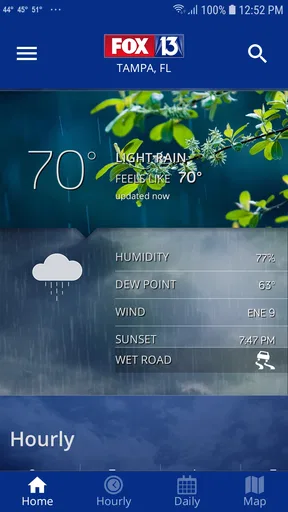
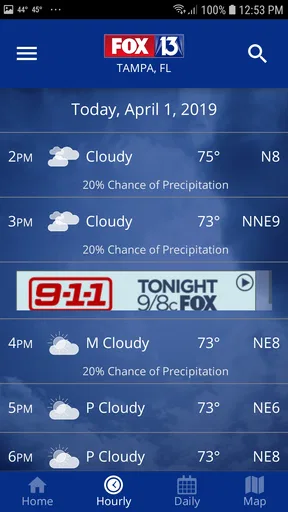
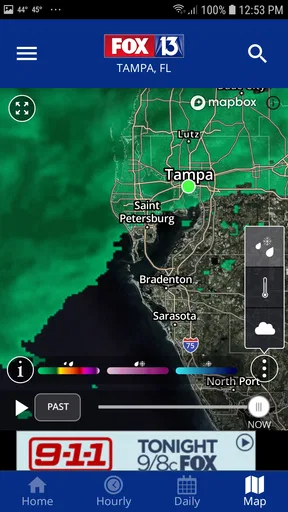
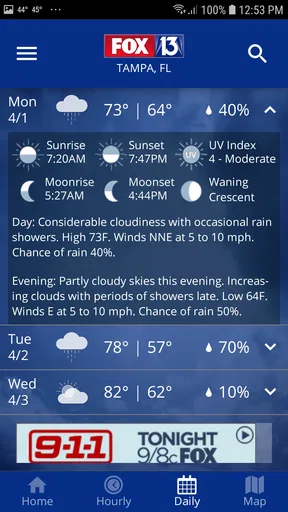
 Analysis by AppCompare
When I want a quick look at Tampa weather without sorting through a crowded national weather service, FOX 13 Tampa: SkyTower Weather makes a strong case for staying local. I found its biggest advantage in the combination of forecasts, live radar, and alerts presented around the Tampa area rather than treating the region as just another point on a nationwide map. That focus makes it especially useful when a storm is moving across the bay and a broad forecast feels too vague.
My overall view is favorable, but not uncritical. This is a practical, free weather app from Fox Television Stations, Inc., and it is aimed at people who want a familiar local news-weather connection more than a highly customizable meteorological workstation. The experience is straightforward enough for everyday checks, yet it can still support more thoughtful decisions about commuting, outdoor plans, school runs, and changing storm conditions.
Why the local focus matters in daily use
The first thing I noticed is that the app’s value depends less on novelty and more on context. A generic weather app may tell me that rain is possible, but a Tampa-focused tool is more helpful when I am trying to understand whether that rain is likely to affect a particular part of the day or route. The difference matters in a place where conditions can change quickly and where a storm that looks distant on a general forecast may still alter plans across the metro area.
I would use it in the morning before leaving home, then check the radar again before heading back. That two-step habit is more useful than relying only on a single daily icon. The forecast gives me the broad expectation, while the radar helps me judge whether the weather developing nearby is worth changing my timing. The app works best as a decision tool, not as a replacement for looking outside or using common sense during severe weather.
Its store summary centers on forecasts, live radar, and alerts, and those three elements explain the app’s practical identity. Forecasts help with planning ahead. Radar gives a more immediate picture of movement. Alerts are valuable when I do not want to repeatedly open the app just to discover that conditions have changed. Together, they create a sensible workflow for a local user who wants awareness without spending much time navigating menus.
I also appreciate that the app is free. That lowers the barrier for occasional users, including someone who only installs a weather app during storm season or before a trip. It carries an Everyone content rating, so it is suitable for a household where different family members may need access to the same basic information. The current release is version 6.2.513, and the listed minimum operating system is iOS 9, which gives it a broad compatibility position for supported devices.
Radar is the feature I would return to most
Forecasts are useful, but radar is where a local weather app can earn a permanent place on my phone. When rain is already forming, I do not necessarily need another paragraph describing the forecast. I need to know whether the area I am traveling through is in the path of the activity, whether the band is moving toward me, and whether waiting a little might make a difference.
Worth Reading Before You Choose

EA SPORTS FC Mobile 26 Is a Bigger Football Game, but It Takes Time

Flipboard Shows What News Apps Must Do Beyond the Feed

Switching to Android Auto Means Rethinking Your Driving Routine

Google Calendar Makes a Crowded Week Easier to Manage

Ludo King Makes the Most of the Minutes Between Plans

Baby Panda World Brings Quick Play to Modern Phones, but Its Game Library Feels Busy
My preferred workflow would be to open the radar before a drive, identify the direction of the weather, and then check again shortly before leaving. This is particularly helpful for outdoor plans because it encourages a more realistic question: “What is happening near me now?” rather than “What does the whole day look like?” That distinction is one of the app’s less obvious strengths.
There is also a useful trade-off here. A radar view can feel more informative than a simple rain percentage, but it asks the user to interpret movement and coverage. Someone who wants one effortless answer may find a basic forecast widget easier. I think SkyTower Weather is better for users willing to spend a few extra seconds looking at the situation instead of treating one number as a guarantee.
Alerts are most useful when they support a routine
Alerts can become annoying when every notification feels equally urgent, so I would not recommend enabling everything without thinking about how I use the phone. The sensible approach is to treat alerts as a safety net and then rely on the forecast and radar for normal planning. That keeps the notifications meaningful rather than turning them into background noise.
For example, I would check the app before work, leave alerts available for changing conditions, and use radar when deciding whether to delay a trip. This division of labor makes the experience calmer. The app does not have to be open constantly, and I do not have to rebuild my schedule around every cloud shown on the map.
A parent could use the same approach for school pickup: check the forecast early, look at the radar before leaving, and pay attention to alerts if the weather becomes more serious. A runner, gardener, or outdoor worker may also find this more useful than a once-a-day glance. The important insight is that alerts are not the whole product; they are most effective when combined with the other two main tools.
Where the experience feels less convincing
The local emphasis is also the app’s main limitation. If I am traveling outside the Tampa area, I would probably prefer a broader weather service with extensive location support and a more consistent nationwide experience. This app makes the most sense when Tampa is the place I live, work, or visit regularly. It is less compelling as my only weather source if my routine crosses several regions.
I also would not choose it for deep weather analysis. People who want a large collection of specialized layers, detailed historical comparisons, highly customized dashboards, or advanced forecasting controls may find a dedicated national weather app more suitable. SkyTower Weather feels designed for clear access to local information, not for users who want to build a personal meteorological control room.
That does not make the simpler approach a flaw for everyone. In fact, too many controls can slow down the exact task most people need: checking whether they should carry an umbrella or postpone an outdoor plan. The limitation appears only when expectations are mismatched. If I expect a focused local companion, the design makes sense. If I expect an exhaustive weather laboratory, I would look elsewhere.
Another point worth considering is that radar interpretation takes practice. The map can show what is happening, but it does not automatically turn every user into an expert at judging storm speed, intensity, or timing. I would avoid treating a clear-looking radar moment as a promise that conditions will remain safe. For serious weather, official emergency guidance should take priority over any single app.
Who will get the most from it
I think the best audience is Tampa-area residents who already value local reporting and want weather information connected to that regional perspective. It is a good fit for someone who checks conditions before commuting, manages outdoor work, plans family activities, or wants a quick way to follow changing rain and storm patterns.
It also suits people who dislike complicated weather apps. The core purpose is easy to understand: open the app for the forecast, inspect the radar when timing matters, and use alerts to avoid missing important changes. That clarity is more valuable than a long feature list for a person who wants dependable daily habits rather than endless customization.
Occasional visitors can benefit too, especially when their plans depend on outdoor time. Before a beach day, a drive, or an event, I would use the app to get a local view instead of relying only on the weather information attached to a general travel service. The local angle may provide a more relevant starting point for understanding the area’s conditions.
On the other hand, I would suggest skipping it as a primary app if you need one tool for many cities, frequent international travel, or detailed technical weather research. A national alternative may be better when location breadth and advanced controls matter more than local focus. I would also avoid depending on any weather app alone for emergency decisions; alerts should complement official instructions, not replace them.
What the adoption numbers suggest, and what they do not
The app has passed one hundred thousand installs and holds a 3.9 average from around three thousand ratings, with 853 written reviews. Those figures suggest that it has found a real audience, while the less-than-perfect average is a useful reminder that the experience will not satisfy everyone equally. I read that combination as evidence of a practical app with a clear purpose rather than a universally loved, all-purpose weather platform.
In my view, the rating is consistent with the trade-off I experienced: the local information is the reason to install it, while the narrower scope and simpler ambitions may frustrate people seeking more depth. I would not judge it fairly against an app built for worldwide coverage. The better question is whether Tampa-specific weather access is valuable enough to justify keeping it on the phone.
The fact that it has been available since July 7, 2014 also gives it the feel of an established product rather than a brand-new experiment. That history does not guarantee that every release will suit every device or preference, but it does make the app easier to consider for someone who wants a familiar local weather option. The developer, Fox Television Stations, Inc., is clearly tied to the FOX 13 Tampa identity, which reinforces the app’s regional purpose.
Small habits that make the app more useful
I would begin by making the app part of a repeatable routine instead of opening it only when the sky already looks threatening. A morning forecast check is useful for the broad plan, but a second radar check just before leaving is better for timing. This avoids the common mistake of treating the morning forecast as fixed for the entire day.
For outdoor plans, I would look at the radar shortly before the activity and again if the plan lasts several hours. That is a more realistic workflow than checking once and assuming the situation will remain unchanged. It also helps me decide whether I need a backup plan, rather than waiting until rain has already started.
I would keep notifications purposeful. If alerts become too frequent, their value can drop because I start dismissing them automatically. The better balance is to use them for awareness while opening the app when I need context. In other words, an alert tells me to pay attention; the forecast and radar help me decide what to do.
Finally, I would compare what the app shows with the conditions around me. Weather information is a guide, not a promise. If visibility is poor, lightning is nearby, or local authorities advise against travel, I would act on that immediate safety information even if the app’s general screen looks manageable. That is not a criticism of this particular product; it is the responsible way to use any weather service.
My final recommendation
After using it as a local planning tool, I see FOX 13 Tampa: SkyTower Weather as a focused and worthwhile free app for people whose daily life is centered on Tampa. Its strongest evidence is practical: forecasts cover planning, live radar adds timing and movement, and alerts help users notice meaningful changes without constantly checking the screen.
Its weaknesses are equally clear. It is not the best choice for broad travel, advanced weather analysis, or users who want a deeply customizable national platform. The radar also rewards a little attention and judgment, so anyone looking for a single unquestionable answer may prefer a simpler alternative.
For me, the deciding factor is relevance. When the question is whether rain or storms may affect my Tampa plans, a local weather app has a clear advantage over a generic forecast screen. I would recommend it to Tampa residents, regular visitors, families, commuters, and outdoor planners who want a straightforward local companion. I would keep a broader service alongside it if I traveled often, but for Tampa-centered daily use, FOX 13 Tampa: SkyTower Weather is a sensible, accessible choice that earns its place through local usefulness rather than unnecessary complexity.
Pros
- Accurate Tampa Bay forecasts with useful neighborhood-level details.
- Live radar helps track storms as they approach your location.
- Severe weather alerts can provide timely warnings during dangerous conditions.
- SkyTower meteorologists offer trusted local insight beyond automated forecasts.
- Clean interface makes hourly and extended forecasts easy to scan.
Cons
- Some advanced radar or forecast features may require an active subscription.
- Frequent alerts can feel excessive during periods of unsettled weather.
- Coverage is most valuable locally and less useful outside the Tampa Bay area.
- Video and radar content may consume significant mobile data.
- Forecast accuracy can vary during rapidly changing tropical weather.
FAQs for FOX 13 Tampa: SkyTower Weather
What is FOX 13 Tampa: SkyTower Weather?
FOX 13 Tampa: SkyTower Weather is a weather app focused on the Tampa Bay area and surrounding communities. It provides current conditions, hourly and extended forecasts, radar imagery, severe weather alerts, and video updates from the FOX 13 weather team. It is especially useful for tracking Florida thunderstorms, tropical systems, heavy rain, flooding, and rapidly changing coastal weather.
Does the app provide accurate local weather forecasts for Tampa Bay?
The app is designed to deliver localized forecasts for Tampa, St. Petersburg, Clearwater, Sarasota, and nearby areas, using information from the FOX 13 meteorology team and weather data services. Forecast accuracy can still vary, particularly during fast-moving storms or tropical weather. For the best results, allow location access or manually select your exact city and compare updates throughout the day.
What severe weather alerts are available in FOX 13 Tampa: SkyTower Weather?
Users can receive notifications for important weather threats, including severe thunderstorms, tornado warnings, tropical storms, hurricanes, flooding, lightning, and other hazardous conditions when coverage is available. Alert settings can generally be adjusted so you receive notifications for your current location or selected areas. Make sure notifications and location permissions are enabled if you want timely warnings.
Does FOX 13 Tampa: SkyTower Weather include radar and live weather video?
Yes, the app includes weather tools intended to make changing conditions easier to follow. Depending on the current version and your location, you may find interactive radar, forecast maps, storm tracking, and video reports from FOX 13 meteorologists. Radar is particularly helpful for watching rain bands and thunderstorms, while video updates can add local context that a basic forecast app may not provide.
Is FOX 13 Tampa: SkyTower Weather free to download and use?
FOX 13 Tampa: SkyTower Weather is generally available as a free download for compatible Android and iOS devices. Some features may depend on advertising, internet connectivity, device permissions, or the app version installed. Mobile data may be used when viewing radar, streaming video, or downloading frequent updates, so users with limited data plans should check their settings before using these features extensively.


